
An SAP ITSM API integration can create more support problems than it solves when both platforms start creating, updating, and closing the same tickets. As a result, duplicate incidents, conflicting status updates, and unclear ownership can make it difficult for support teams to know which system holds the authoritative record.
However, the challenge goes beyond connecting SAP Solution Manager 7.2 or an SAP S/4HANA environment to an external service platform. Instead, teams must define which system owns each process, what information the API should exchange, and how updates should flow between platforms. Without these rules, ticket synchronization can turn into workflow duplication instead of process automation.
Therefore, this guide explains how SAP ITSM API integrations connect with external platforms. In addition, it covers the key ownership, synchronization, and workflow boundaries teams should establish before implementation.
Why SAP ITSM Integrations Fail
Many organizations connect SAP support processes with external IT service management platforms.
Common examples include:
- ServiceNow
- Jira Service Management
- Custom enterprise portals
- Monitoring platforms
- Partner support systems
The goal is usually simple:
A user creates a ticket in one platform.
The information reaches SAP support.
Teams collaborate.
The issue gets resolved. However, integration problems often appear when teams focus only on data exchange. An API connection can successfully transfer a ticket and still create operational problems.
What Is SAP ITSM API, and Why Does It Matter?
SAP ITSM API provides a way for SAP service management processes to communicate with external applications and platforms. An API allows systems to exchange information through predefined interfaces instead of manual data entry.
In an SAP support environment, an API integration can help transfer information such as:
- Incident details
- User information
- Priority values
- Status updates
- Resolution notes
- Attachments
SAP ITSM API vs Manual Ticket Handling
Without API integration, organizations often depend on manual processes.
A support analyst may need to:
- Read an external ticket
- Create a SAP incident manually
- Copy information between systems
- Update both platforms separately
This creates several risks:
- Incorrect information transfer
- Delayed updates
- Duplicate records
- Missing history
A SAP ITSM API reduces these manual steps by creating controlled communication between systems.
| Area | Manual Process | SAP ITSM API Integration |
| Ticket creation | Manually copied between systems | Automated data exchange |
| Status updates | Updated separately | Synchronized through rules |
| Data accuracy | Depends on users | Controlled field mapping |
| Support visibility | Limited | Shared operational view |
However, automation only works when teams define clear integration rules.
How SAP ITSM API Architecture Works
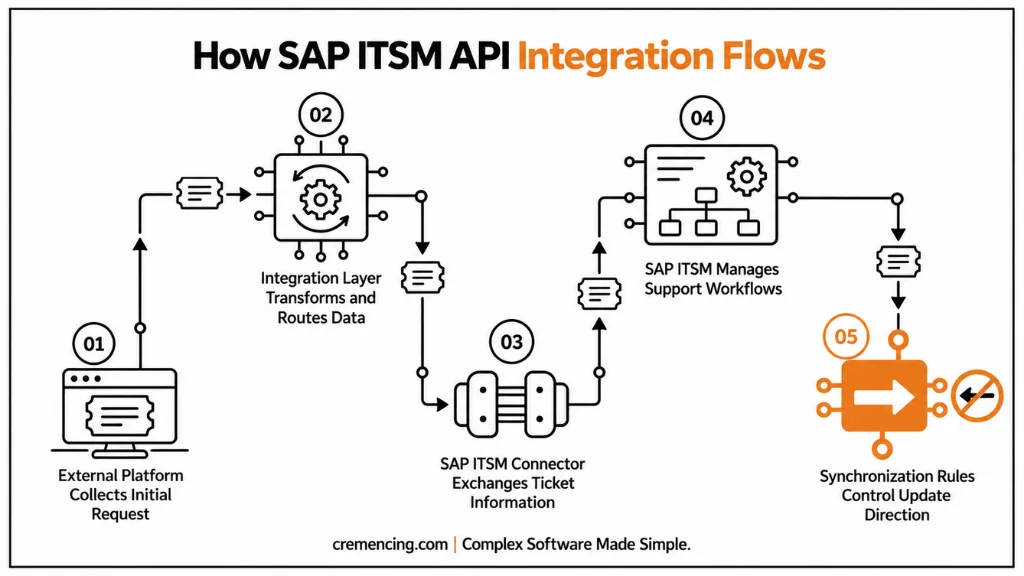
A typical SAP ITSM API integration contains several layers.
Understanding these layers helps teams design better integrations.
1. External Platform Layer
This is the system where users or external teams create requests.
Examples:
- Enterprise service desk
- Customer portal
- Monitoring platform
This platform collects the initial request information.
2. Integration Layer
The integration layer manages communication between systems.
It may handle:
- API calls
- Data transformation
- Authentication
- Error handling
- Message routing
For SAP landscapes, organizations may use integration technologies such as SAP Integration Suite depending on architecture requirements.
3. SAP ITSM Layer
The SAP ITSM system receives and processes the request.
Depending on the environment, this may involve:
- SAP Solution Manager ITSM processes
- SAP Cloud ALM service scenarios
- Connected SAP applications
The SAP system manages the internal support workflow.
4. Synchronization Rules
4. Synchronization Rules
Synchronization rules define what information moves between systems and how each platform maps that information. For example, an external platform may use Status = Assigned, while SAP ITSM uses Status = In Process. Therefore, teams must define the mapping clearly before enabling synchronization. Otherwise, the systems may repeatedly update each other, which can create conflicting statuses and workflow loops.
The Role of SAP ITSM Connector in External Platform Integration
A SAP ITSM connector acts as the communication bridge between SAP service management processes and ex ternal applications.The connector manages how information moves between systems.
A SAP ITSM connector may handle:
- Ticket creation
- Field mapping
- Status synchronization
- User information exchange
- Error logging
The connector does not replace process design. It only enables communication. A common mistake is assuming that installing a connector automatically creates a complete support process.
It does not.
Teams still need to define:
- Ticket ownership
- Synchronization direction
- Approval rules
- Escalation handling
Define the System of Record Before Integration
Every SAP ITSM API project should answer one important question: Which platform owns the process?
There are three common approaches.
Model 1: External Platform Owns the Ticket
In this model:
- Users create tickets externally.
- The external platform controls workflow.
- SAP receives relevant information.
- SAP teams work on technical resolution.
This approach is common when companies already use an enterprise ITSM platform. The SAP ITSM connector mainly transfers technical information and updates.
Model 2: SAP ITSM Owns the Ticket
In this model:
- SAP Solution Manager ITSM manages incidents.
- External systems send requests through integration.
- SAP controls status and resolution lifecycle.
This approach is common when SAP support operations are managed centrally inside SAP tools.
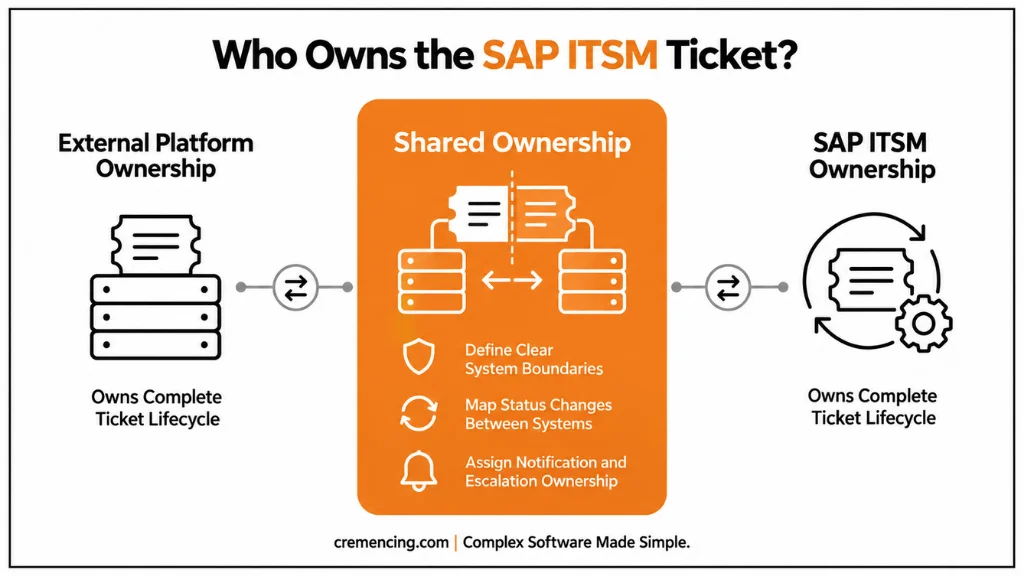
Model 3: Shared Ownership
Both systems exchange information and manage parts of the lifecycle.
This model requires stronger governance.
Teams must define:
- Which status changes are allowed
- Which fields are synchronized
- Which system triggers notifications
Without these rules, shared ownership creates confusion.
SAP ITSM API Field Mapping Strategy
Field mapping is one of the most important parts of API integration.Different platforms often use different terminology.
Example:
External Platform:
“Priority = Critical”
SAP ITSM:
“Priority = Very High”
The API integration must translate these values correctly. Also read what teams should configure first to build a reliable.
Common fields include:
| External System Field | SAP ITSM Field |
| Ticket ID | Incident Number |
| Description | Short Text / Long Text |
| User | Reporter / Business Partner |
| Priority | Incident Priority |
| Status | Processing Status |
| Comments | Activity Log |
A good SAP ITSM connector does not simply copy fields.
It applies business rules.
For example:
A customer-impacting issue may automatically become a high-priority SAP incident. A general information request may remain a normal service request.
Authentication and Security Considerations for SAP ITSM API
Security should be considered before exposing APIs between platforms.
SAP ITSM integrations often exchange sensitive operational information.
Examples:
- User details
- System information
- Business process issues
- Technical error details
A secure SAP ITSM API design should consider:
Authentication
Systems should verify each other before exchanging information.
Common approaches include:
- OAuth-based authentication
- API keys
- Certificate-based authentication
The exact method depends on the SAP platform and integration architecture.
Authorization Control
Not every integration user should have unlimited access.
Teams should define:
- Which objects can be created
- Which fields can be updated
- Which actions are permitted
For example:
An external monitoring platform may create incidents but should not close them automatically.
Data Protection
Organizations should review:
- What information is transferred
- Where data is stored
- Who can access synchronized records
A well-designed integration only exchanges required information.
Common SAP ITSM API Integration Scenarios
SAP ITSM API integrations are used in several enterprise situations.
Start With Process Design, Not API Development
One common mistake is starting with technical integration immediately.
Teams define:
- Endpoints
- Payload structures
- Authentication
before deciding how support processes should work.
The better approach is:
First define:
- Ticket ownership
- Workflow responsibilities
- Status mapping
- Escalation rules
Then design the API integration.
Avoid Synchronizing Everything
More synchronization does not always mean better integration.
Sending every field between systems can create:
- Data conflicts
- Performance issues
- Maintenance complexity
Synchronize only information required by each team.
Create Error Handling Processes
API failures will happen.
Examples:
- Authentication failure
- Network interruption
- Invalid ticket data
- Mapping errors
A reliable SAP ITSM connector should provide:
- Error logs
- Retry handling
- Failure notifications
- Support ownership
Without error management, failed integrations become hidden operational problems.
Monitor Integration Performance
After implementation, teams should track:
- Failed API messages
- Synchronization delays
- Duplicate records
- Processing errors
Integration monitoring is as important as ticket monitoring.
SAP ITSM API Integration Architecture Overview
SAP ITSM API Integration Architecture Overview
A typical enterprise setup connects the external platform to SAP ITSM through an API or integration layer. The flow moves from the external platform to the API or integration layer, then through the SAP ITSM connector to SAP Solution Manager ITSM or SAP Cloud ALM, and finally to the SAP support teams.
Each layer has a specific responsibility. The external platform manages user interaction, while the integration layer controls communication between systems. SAP ITSM manages the support processes. As a result, this separation keeps responsibilities clear and helps prevent workflow conflicts.
Conclusion
SAP ITSM API integration is not only about connecting two systems. The real challenge is maintaining a controlled support process where ownership, workflows, and data synchronization remain clear. Without proper planning, API connections can create duplicate tickets, conflicting updates, and unnecessary complexity.
A well-designed SAP ITSM connector helps organizations connect external platforms while keeping SAP support operations organized. Furthermore, teams can improve collaboration by defining integration rules, securing communication, and monitoring synchronization without creating workflow chaos.
More importantly, teams should treat integration as part of the overall ITSM architecture rather than as a standalone technical connection. They should define which system owns each data element, establish clear rules for ticket creation and updates, and prevent unnecessary data transfers. In addition, teams should build logging, error handling, authentication, and monitoring into the integration from the beginning.
When these controls are in place, SAP ITSM API integration can reduce manual handoffs, improve incident visibility, and create a more consistent support experience across platforms. Ultimately, the goal is not simply to move ticket data between systems. Instead, teams should build a reliable support workflow that remains manageable as SAP environments and service operations grow.
Frequently Asked Questions
What is an SAP ITSM tool?
SAP ITSM tools include a platform that enables organizations to handle SAP support services, such as incidents, requests for service, problem solving, and dealing with changes, in a structured way.
Teams no longer handle SAP problems with email correspondence and manual tracking – they now cover the ownership, tracking and full history of resolution through ITSM workflows.
What does the full form of SAP ITSM stand for?
The full form is SAP Information Technology Service Management.It is about the processes and tools for managing IT services related to SAP, based on service management practices.
By establishing the rules and workflows for handling incidents, requests, changes, and problems in SAP environments, SAP ITSM enables organizations to manage their support activities effectively.
Why Companies use SAP ITSM solutions?
SAP environments are getting more complex, and this is why companies use SAP ITSM solutions. Today, SAP S/4HANA, cloud applications, integrations and various support teams are common features of modern landscape.
An SAP ITSM solution offers more structured workflows, as well as improved reporting, clear ownership and increased visibility of the services compared to conventional methods of support.
What is the difference between SAP ITSM and a normal ticketing system?
The normal ticketing system primarily documents user problems.
SAP ITSM supports the lifecycle of the service.
It includes:
- Incident management
- Service request management
- Problem management
- Change processes
- Knowledge management
- SLA monitoring
It’s not just about keeping track of tickets, but enhancing the SAP support processes.
Is SAP Solution Manager an SAP ITSM tool?
Yes, SAP Solution Manager 7.2 does have IT Service Management capabilities.
Structured incident handling, application lifecycle management processes, and handling of service requests are addressed by many organizations that operate SAP ECC and SAP S/4HANA on-premise landscapes with SAP Solution Manager ITSM.
The best way to determine if SAP Cloud ALM is a suitable solution is by considering the organization’s future SAP plans and operations.
An SAP ITSM tool can enhance incident management in several ways.
An SAP ITSM tool enhances incident management by establishing clear workflows for reporting, categorizing, assigning, escalating and resolving incidents.
Rather than trying to communicate manually, support teams can monitor:
- Responsible team
- Priority
- Status
- Resolution history
This helps to minimize delays and increase accountability.
What are the key attributes that companies should consider when selecting an SAP ITSM solution?
Businesses should consider some of the following features:
- Incident management workflows
- Service request automation
- SLA tracking
- Knowledge management
- Problem management
- Reporting capabilities
- SAP landscape integration
- Change management support
The right depend on the SAP landscape and support maturity of the organization.
Is SAP S/4HANA possible with SAP ITSM tools?
To answer your question, yes, SAP ITSM tools can also be used in SAP S/4HANA environments because it will enable teams to have a proper control of the operational issues occurring in them.
Applications, integrations and cloud services, such as SAP Fiori applications, are often part of an SAP S/4HANA environment. Structured service management assists teams to coordinate technical and functional activities.





One Response