
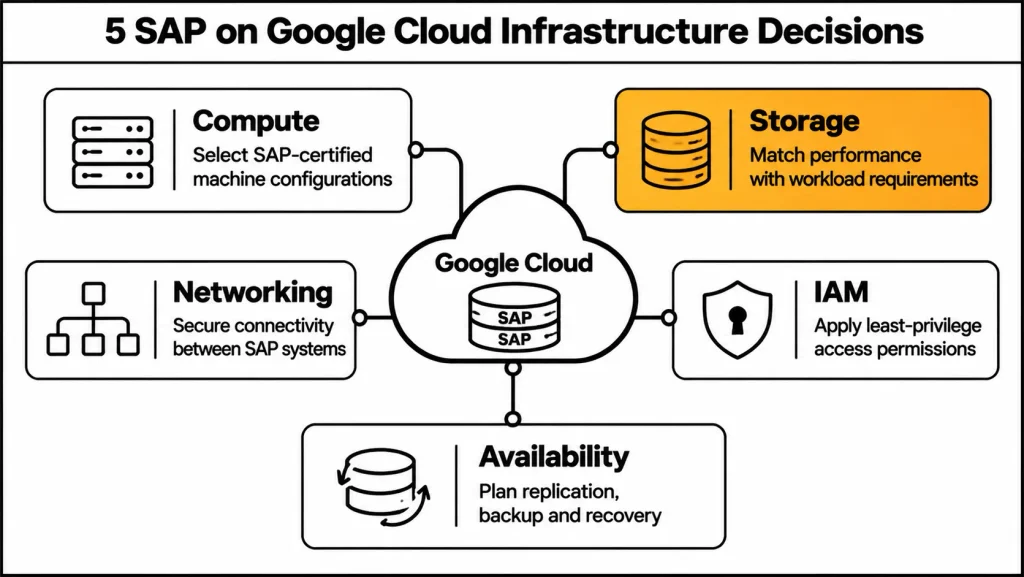
Fundamentally, running SAP on Google Cloud, also known as SAP on GCP, requires more than moving existing SAP systems to virtual machines. Therefore, organizations must make important infrastructure decisions around computing, storage, networking, identity and access management, security, availability, and ongoing operations.
Specifically, SAP workloads, particularly SAP HANA and SAP S/4HANA, require carefully planned infrastructure to maintain performance, security, and reliability. Moreover, Google Cloud provides SAP-certified infrastructure, scalable computing resources, automation tools, and analytics capabilities to support enterprise SAP environments. Consequently, In this way, SAP on GCP allows organizations to combine SAP-certified infrastructure with scalable cloud resources and enterprise-grade services.
As a result, successful implementation also depends on selecting the right architecture, understanding SAP certification requirements, and clearly defining responsibilities between SAP, Google Cloud, and internal IT teams.
With these requirements in mind, here are seven important infrastructure decisions to consider when running SAP on GCP.
1. Choose the Right SAP-Certified Compute Infrastructure on GCP
To begin with, choosing the right compute infrastructure for SAP on GCP is one of the first decisions when planning an enterprise SAP environment.
For this purpose, Google Cloud provides SAP-certified virtual machines through Compute Engine and Bare Metal Solution for workloads requiring dedicated physical infrastructure. Therefore, the appropriate machine type depends on the SAP product, database requirements, workload size, and SAP certification.
Before selecting a machine type, organizations should review the following important considerations:
- SAP-certified machine types for production workloads.
- Memory requirements for SAP HANA databases.
- CPU capacity for SAP application servers.
- Operating system and SAP version compatibility.
- Availability of certified infrastructure in the selected region.
Furthermore, organizations should decide whether a centralized or distributed architecture is appropriate. For example, a centralized deployment can place SAP application components and the HANA database on one instance, making it suitable for certain development and non-production environments. - In contrast, distributed deployments separate database and application components across multiple instances and are more appropriate for production environments with heavier workloads. Infrastructure consideration: Verify supported machine types, sizing, and regional availability before provisioning production resources.
Useful resources: SAP-certified machine types | SAP S/4HANA reference architecture
2. Design SAP on GCP Storage Around SAP HANA Performance
Moreover, storage architecture for SAP on GCP directly affects database performance, particularly when running SAP HANA workloads.
| Storage option | Primary purpose |
| Persistent Disk | Block storage for Compute Engine workloads |
| Hyperdisk | High-performance storage options where supported |
| Cloud Storage | Backup, archival, and data exports |
| Filestore | Managed shared file systems |
| Google Cloud NetApp Volumes | Enterprise file storage requirements |
| In particular, organizations must consider the storage requirements of individual SAP HANA directories, including /hana/data, /hana/log, and /hana/shared. These directories have different performance and storage requirements. | |
| Similarly, shared file systems such as /sapmnt and SAP transport directories require appropriate planning, particularly in distributed environments. | |
| Similarly, backup and archive storage should be designed separately from primary database storage. Cloud Storage can support backup retention and archival through compatible SAP backup integrations. | |
| When selecting storage, organizations should also account for the following factors: |
First, consider disk performance and throughput.
- Required IOPS and latency.
- Moreover, consider storage capacity and future growth.
- Supported SAP configurations.
- Backup retention and recovery requirements.
Infrastructure consideration: Match storage performance and configuration to the SAP workload instead of choosing infrastructure based on capacity alone.
Useful resources: Google Cloud storage options for SAP | Cloud Storage pricing
3. Plan Network Connectivity and Architecture for SAP on GCP
Moreover, network planning for SAP on GCP is essential for reliable communication between databases, application servers, users, and connected enterprise systems.Google Cloud provides a global private fiber network that supports connectivity between regions and enterprise environments.
To ensure reliable connectivity, organizations should consider the following networking components:
- Virtual Private Cloud (VPC) networks.
- Regional subnets and firewall rules.
- Cloud VPN for secure connectivity.
- Cloud Interconnect for enterprise connectivity.
- Cloud DNS for hostname resolution.
- Internal load balancing where supported by SAP architecture.
Hybrid connectivity is particularly important for organizations that need to retain certain SAP components, corporate identity systems, or legacy applications on-premises during migration.
Moreover, organizations should decide whether a Shared VPC architecture is appropriate. - With this approach, Shared VPC allows multiple projects to use a common VPC network while maintaining separate resource administration. This can help organizations manage production, non-production, and supporting environments.
Moreover, network planning should address DNS configuration, firewall restrictions, latency, bandwidth, and communication between SAP application and database servers.Infrastructure consideration: Keep SAP database and application communication on appropriate private network paths, and avoid unnecessary public exposure of production systems.
Useful resources: Google Cloud networking | Cloud VPN | Cloud Interconnect
4. Establish IAM and Resource Hierarchy for SAP on GCP
Identity and Access Management (IAM) is an important part of SAP on GCP because it determines who can access Google Cloud resources and which operations they can perform. For SAP environments, access management should be planned before infrastructure deployment.
Google Cloud uses an organization, folder, project, and resource hierarchy. Permissions assigned to parent resources can be inherited by child resources.
Consequently, an access policy applied at the project level can affect resources such as Compute Engine virtual machines and Cloud Storage buckets within that project.
To establish proper access control, organizations should consider the following IAM decisions:
- Organizing SAP resources into appropriate projects.
- Defining which team members can access infrastructure.
- Assigning predefined IAM roles according to responsibilities.
- Creating service accounts for applications and services.
- Following the least-privilege principle.
- Separating infrastructure administration from SAP administration and security auditing.
Additionally, service accounts allow applications and services to access Google Cloud resources with defined permissions. Therefore, they should have only the permissions required for their specific functions.
Equally important, organizations should understand the difference between infrastructure-level IAM permissions and SAP application-level user permissions.In comparison, Google Cloud IAM controls access to cloud resources, while SAP application roles manage access within SAP systems.
Google Cloud recommends following the least-privilege principle and explicitly verifying access attempts through its Zero Trust security principles. - Infrastructure consideration: Define access responsibilities, service account permissions, and resource hierarchy before deploying production SAP resources.
Useful resources: Google Cloud IAM overview | IAM security best practices | Authentication overview
5. Design High Availability and Disaster Recovery for SAP on GCP
High availability and disaster recovery planning for SAP on GCP are essential for protecting business operations against unexpected interruptions.
Google Cloud provides infrastructure features such as Compute Engine live migration and automatic restart to minimize downtime associated with infrastructure maintenance and certain instance failures.
Even so, these features do not replace a complete SAP high-availability and disaster recovery architecture.
To prepare for unexpected disruptions, organizations should plan the following:
- High availability across zones.
- Disaster recovery across regions where required.
- SAP HANA database replication.
- SAP central services availability.
- Backup and recovery procedures.
- Recovery Point Objective (RPO) and Recovery Time Objective (RTO).
- Regular disaster recovery testing.
For example, an SAP HANA production environment may use a primary deployment in one zone and a secondary recovery environment in another zone or region, depending on business requirements and supported architecture.
Similarly, SAP application components such as ASCS, ERS, PAS, and AAS require appropriate availability planning.In high-availability configurations, Linux cluster management and supported replication mechanisms can help maintain service continuity.
More importantly, disaster recovery involves more than simply copying database backups. Organizations also need recovery procedures, infrastructure provisioning, network configuration, and tested operational runbooks.
Infrastructure consideration: Define RPO and RTO before selecting replication, backup, and recovery configurations. Test the complete recovery process rather than assuming replication alone guarantees availability.
Useful resources: SAP resilience on Google Cloud | SAP S/4HANA reference architecture
6. Implement Security, Compliance, and Data Governance
Operating SAP on GCP requires a clear strategy for deployment, monitoring, maintenance, and infrastructure cost optimization.
Google Cloud provides IAM, service accounts, encryption capabilities, audit logging, and network security controls for enterprise workloads.
To strengthen security and governance, organizations should establish clear policies for the following areas:
- User authentication and access permissions.
- Service account management.
- Data encryption and key management.
- Network segmentation.
- Firewall restrictions.
- Audit logging and monitoring.
- Data residency and regulatory requirements.
For example, Cloud Key Management Service (Cloud KMS) supports customer-managed encryption keys for eligible services. Organizations should verify the key management options available for each service they use.
Furthermore, production SAP database and application servers should generally use private IP addresses where possible. Administrative access can be controlled through approved private connectivity and secure access methods.
Moreover, organizations should review Cloud Audit Logs and identify the appropriate administrative and data access logging requirements. Centralized logging can help security teams review activities across different projects. - For organizations with specific regulatory and data residency requirements, Google Cloud Assured Workloads provides additional compliance and sovereign control capabilities.
In addition, production and non-production environments should have appropriate access separation and governance controls. Infrastructure consideration: Combine least-privilege IAM, private networking, encryption, audit logging, and data governance to establish a secure SAP environment.
Useful resources: Google Cloud security | Cloud KMS | Assured Workloads
7. Plan Deployment, Monitoring, and Cost Optimization
SAP Deployment and Automation
- The final decision concerns how SAP infrastructure will be deployed…
- In addition to manual deployment, Google Cloud supports automated SAP deployments.
- Terraform, Workload Manager, SAP Cloud Appliance Library, Google Cloud Marketplace wali table.
- Workload Manager wala paragraph.
The final decision concerns how SAP infrastructure will be deployed, monitored, maintained, and optimized after implementation.
In addition to manual deployment, Google Cloud supports automated SAP deployments. As a result, organizations can use infrastructure automation to create repeatable environments and reduce manual configuration.
1. SAP Deployment and Automation
| Deployment tool | Purpose |
|---|---|
| Terraform | Automate infrastructure provisioning |
| Workload Manager | Deploy and evaluate supported SAP workloads |
| SAP Cloud Appliance Library | Deploy SAP solutions for supported scenarios |
| Google Cloud Marketplace | Access SAP-related partner offerings |
Workload Manager can help evaluate SAP workloads against recommendations from SAP, Google Cloud, and operating system vendors. Its guided deployment capabilities also support the provisioning of certain SAP environments.
2. SAP Monitoring and Operations
Furthermore, organizations running SAP on Compute Engine should review the requirements for Google Cloud’s Agent for SAP. Google Cloud documentation identifies installation of this agent on supported SAP instances as a support prerequisite for collecting required SAP Host Agent metrics.
Operational responsibilities should be clearly defined between infrastructure teams, SAP Basis administrators, security teams, and service providers.
3. SAP on GCP Cost Optimization
| Cost component | What affects the cost |
|---|---|
| Compute Engine | VM size, vCPU, memory, and operating time |
| Storage | Disk type, capacity, performance, and snapshots |
| Cloud Storage | Backup volume, storage class, and retention |
| Networking | Data transfer, VPN, Interconnect, and load balancing |
| Monitoring | Log ingestion and retention |
| SAP licensing | BYOL, RISE with SAP, or other contractual arrangements |
For example, Committed Use Discounts may help manage infrastructure costs for steady production workloads. Non-production environments can also use scheduled VM shutdowns and appropriate resource sizing.
Beyond direct infrastructure expenses, organizations should also account for disaster recovery infrastructure, cross-region replication, backup retention, migration data transfers, and operational support.
SAP licensing should be verified through SAP or the relevant reseller. Direct SAP deployments on Google Cloud and RISE with SAP have different licensing and service responsibility arrangements.
RISE with SAP S/4HANA Cloud Private Edition is managed by SAP and includes cloud operations and technical support under its offering. Direct infrastructure deployments generally require customers or their contracted service partners to manage the SAP environment.
How SAP and Google Cloud Work Together
SAP on GCP creates opportunities to connect enterprise applications with Google Cloud analytics and AI services. SAP provides enterprise applications and business process management, while Google Cloud provides infrastructure, networking, analytics, and AI capabilities.
Additionally, organizations can run SAP S/4HANA on Google Cloud and extend their environments through services such as BigQuery and Vertex AI.Google Cloud can support analytics and data integration around SAP systems, allowing organizations to use enterprise data beyond traditional ERP processes.
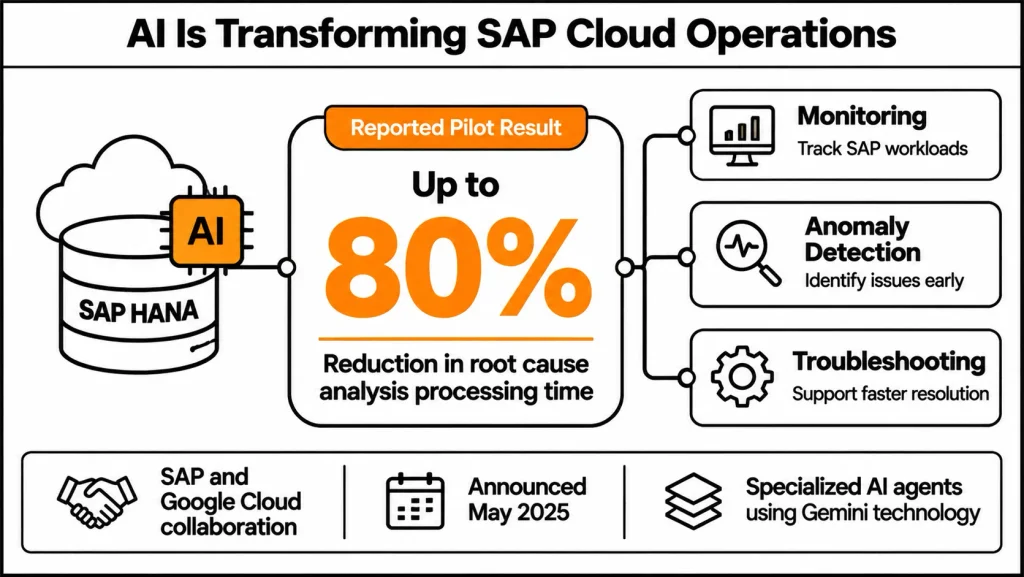
Beyond analytics and data integration, the partnership also extends to AI-powered operations. In May 2025, SAP and Google Cloud announced work on AI-managed operations for RISE with SAP. Their collaboration described specialized AI agents using Gemini technology to monitor workloads, identify anomalies, optimize performance, and support troubleshooting.
Additionally, the announcement reported up to an 80% reduction in root cause analysis processing time during pilot phases, especially for SAP HANA. This was a reported pilot result, not a guaranteed performance improvement for every SAP deployment.
Conclusion
Running SAP on Google Cloud requires careful decisions across compute, storage, networking, IAM, availability, security, and ongoing operations.
Google Cloud provides SAP-certified infrastructure, deployment automation, monitoring capabilities, and integration opportunities with analytics and AI services.
Nevertheless, selecting the right machine types, storage configurations, access permissions, network architecture, and recovery procedures remains essential for a successful implementation. Organizations should begin with an assessment of their existing SAP landscape, identify infrastructure and business requirements, and verify SAP certification, regional availability, and supportability before deployment.
Ultimately, by addressing these seven infrastructure decisions early, businesses can establish an SAP environment on Google Cloud that supports performance, security, availability, and future growth.
Frequently Asked Questions
1. What is SAP on Google Cloud?
SAP on Google Cloud is a solution portfolio for running SAP workloads using Google Cloud infrastructure and services. It includes Compute Engine, Bare Metal Solution, storage, networking, IAM, monitoring, and deployment automation.
2. Can SAP HANA run on Google Cloud?
Yes. SAP HANA can run on SAP-certified Google Cloud infrastructure, including supported Compute Engine machine types. The appropriate configuration depends on database memory requirements, workload size, and SAP certification.
3. Does Google Cloud provide managed SAP services?
Google Cloud provides infrastructure and operational tools for SAP workloads. Customers generally manage their SAP infrastructure and applications themselves or through a managed-service partner. RISE with SAP provides a separate managed-service offering operated by SAP.
4. How does IAM work for SAP on Google Cloud?
Google Cloud IAM controls access to infrastructure resources through roles and permissions. Service accounts provide identities for applications and services. Organizations should follow least-privilege access and separate administrative responsibilities.
5. What storage options are available for SAP on GCP?
Options include Persistent Disk, supported Hyperdisk configurations, Cloud Storage, Filestore, and Google Cloud NetApp Volumes. Selection depends on performance, capacity, shared file system, and backup requirements.
6. How can organizations protect SAP workloads on Google Cloud?
Organizations can use IAM, service accounts, private networking, firewall restrictions, encryption, Cloud KMS, and Cloud Audit Logs. Compliance and data residency requirements should also be included in the architecture.
7. How is disaster recovery planned for SAP on Google Cloud?
Disaster recovery planning depends on SAP components and business recovery requirements. Common considerations include regional replication, backup storage, recovery runbooks, and regular testing against defined RPO and RTO targets.
8. Can SAP deployments on Google Cloud be automated?
Yes. Google Cloud provides Terraform configurations and Workload Manager deployment capabilities. These tools help standardize infrastructure provisioning and support SAP-certified deployment configurations.
9. What are the main costs of running SAP on Google Cloud?
The main costs include Compute Engine instances, storage, backup resources, networking, monitoring, and support. SAP software licensing is handled separately according to the organization’s SAP contract.
10. What should organizations check before deploying SAP on GCP?
Organizations should check SAP-certified machine types, regional availability, storage performance, network connectivity, IAM permissions, quotas, SAP licensing, backup requirements, and disaster recovery objectives.
References and Further Reading
- Google Cloud – SAP on Google Cloud Documentation
- Google Cloud – Overview of SAP on Google Cloud
- Google Cloud – SAP S/4HANA Reference Architecture
- Google Cloud – IAM Overview
- Google Cloud – IAM Security Best Practices
- Google Cloud – Compute Engine Pricing
- Google Cloud – Cloud Storage Pricing
- Google Cloud – Pricing Calculator