

SAP HANA on Cloud gives organizations a flexible way to run enterprise database workloads, process data in real time, and support modern analytics. However, moving SAP HANA to a cloud environment does not automatically guarantee better performance. In fact, results depend on deployment choices, memory and compute capacity, storage design, data models, network connectivity, and recovery planning.
Moreover, SAP HANA supports transactional and analytical processing within the same database platform. In addition, its in-memory processing, column-oriented storage, parallel execution, and data integration capabilities help businesses work with large volumes of enterprise information.
Therefore, organizations evaluating cloud deployment must also understand the difference between running SAP HANA on cloud infrastructure and using SAP HANA Cloud. Moreover, these options have different management responsibilities and architectural considerations.
This article explains the core architecture and six decisions that influence the performance, scalability, and reliability of SAP HANA environments.
Understanding SAP HANA and Its Cloud Architecture
To begin with, SAP HANA is an in-memory, column-oriented relational database platform developed to support both online transaction processing (OLTP) and online analytical processing (OLAP). Instead of maintaining separate systems for every transactional and analytical workload, organizations can use SAP HANA to process both types of operations within one database environment. Managed database services allow organizations to combine database processing capabilities with flexible cloud infrastructure and deployment options.
For better performance, SAP HANA keeps actively processed data in memory to reduce repeated disk access. Nevertheless, it does not operate entirely in RAM. Its persistence layer stores data and redo log information on disk to maintain transaction durability and support recovery.
Meanwhile, SAP HANA Cloud extends the HANA platform through a managed cloud database service. It supports enterprise workloads, data integration, multi-model processing, and advanced analytics. Additionally, its database and data lake components can support different data requirements within a cloud environment.
SAP HANA on Cloud Infrastructure vs SAP HANA Cloud
However, these two deployment approaches are related but not identical.
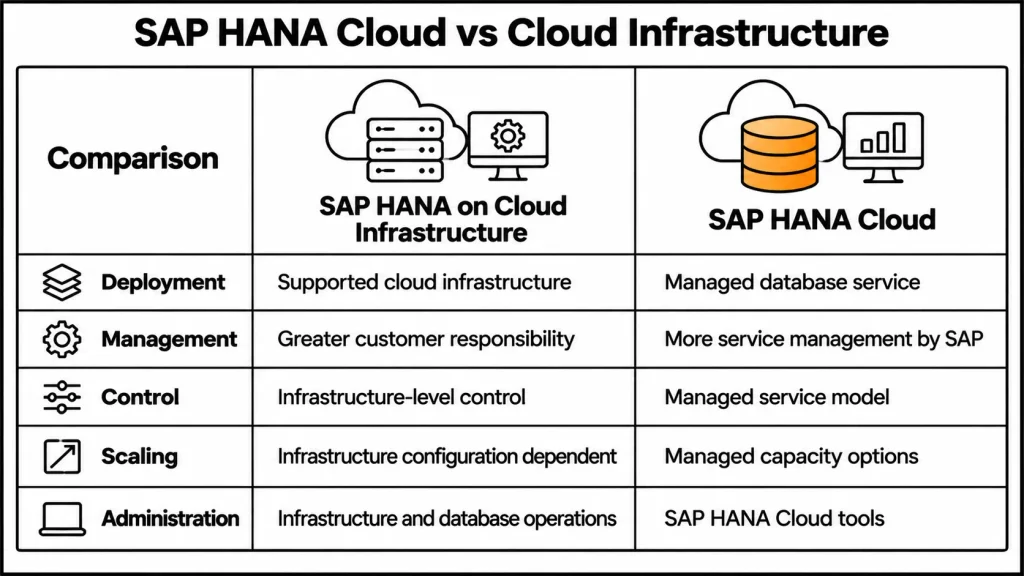
SAP HANA can run on supported cloud infrastructure from providers such as Amazon Web Services, Microsoft Azure, and Google Cloud. In this model, organizations have greater responsibility for infrastructure configuration, operating systems where applicable, database operations, monitoring, and recovery planning.
SAP HANA Cloud is a managed database service. SAP manages more of the underlying service operations, while customers remain responsible for their data, users, access permissions, integrations, and application requirements.
| Area | SAP HANA on Cloud Infrastructure | SAP HANA Cloud |
| Deployment | SAP HANA runs on supported cloud infrastructure | Managed cloud database service |
| Infrastructure management | Greater customer responsibility | More underlying service management handled by SAP |
| Operational control | More infrastructure-level control | Managed service model |
| Scaling | Depends on supported infrastructure and configuration | Managed capacity options |
| Administration | Requires planning for infrastructure and database operations | Uses SAP HANA Cloud administration tools |
| Suitable for | Organizations requiring infrastructure-level control | Organizations seeking a managed database environment |
Ultimately, the appropriate option depends on workload requirements, operational responsibilities, existing SAP systems, and business objectives.
Understanding SAP HANA Architecture
At its core, SAP HANA architecture combines database services, in-memory processing, storage, and application connectivity. As a result, understanding its components helps organizations make better decisions about performance and operations. A well-planned SAP HANA on Cloud architecture helps organizations manage database resources, application connections, and operational requirements.
Core Database Components
Index Server
For example, the Index Server is a central component of SAP HANA. It manages core database processing, including SQL requests, data storage, and transaction execution.
Calculation Engine
The Calculation Engine processes complex calculations, joins, aggregations, and analytical operations. It helps execute data-intensive logic within the database rather than moving unnecessary data to external systems.
Persistence Layer
The persistence layer maintains data and redo logs on storage. Savepoints and log information help protect committed transactions and support database recovery after a failure or restart.
SQL and SQLScript Processing
SQL and SQLScript allow applications and database users to execute queries and procedures. They also support data-intensive operations within the database environment.
SAP HANA also supports multitenant database containers. A system database manages the overall environment, while tenant databases maintain separate data, users, catalogs, and services.
SAP S/4HANA Architecture Layers
SAP S/4HANA architecture can also be understood through three main layers.
| Architecture layer | Main responsibility | Key technologies |
| Presentation layer | Provides the user interface for business applications | SAP Fiori |
| Application layer | Handles business logic and application processing | ABAP, AMDP, CDS |
| Database layer | Stores and processes enterprise data | SAP HANA |
As a result, these layers support business transactions, application functions, and access to operational information
Six Architecture Decisions That Shape SAP HANA Performance
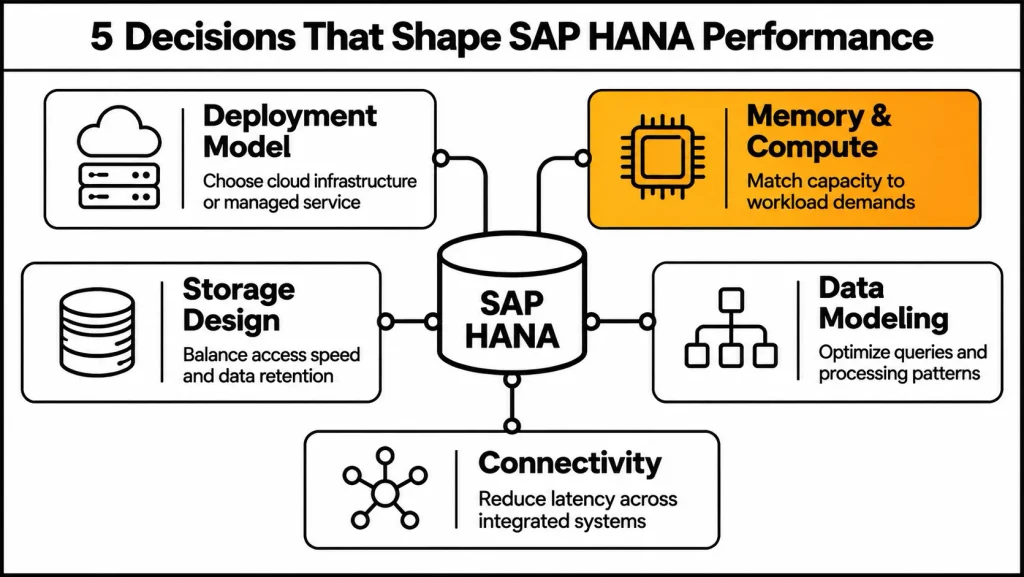
The performance of an SAP HANA cloud environment depends on several connected decisions. In addition,More importantly, each choice affects how the database processes workloads, manages resources, and communicates with other systems.
1. Choose the Right Cloud Deployment Model
The first decision is where and how SAP HANA will operate.
Organizations can choose between on-premises, cloud infrastructure, and managed cloud database services. Moreover, each option provides a different balance of control, operational responsibility, and flexibility.
On-premises deployment gives organizations direct control over their infrastructure and database environment. Cloud infrastructure provides access to supported cloud resources while requiring suitable infrastructure and operational planning. SAP HANA Cloud offers a managed database service for organizations that want SAP to manage more of the underlying database environment.
Alternatively, hybrid deployment is another option. Businesses can retain selected systems on-premises while using cloud services for analytics, data integration, or other workloads.
The decision should consider existing SAP applications, security requirements, infrastructure capacity, business continuity, and long-term operating costs.
2. Plan Memory and Compute Sizing
Memory and compute sizing directly influence SAP HANA performance.
Because SAP HANA uses in-memory processing, organizations must estimate how much memory their active data and workloads require. They should also consider CPU capacity, concurrent users, transaction volumes, and analytical processing requirements.
For this reason, underestimating resources can create capacity pressure and affect query execution. Conversely, oversizing can increase infrastructure costs without providing meaningful benefits.
A suitable sizing assessment should include:
- Current database size and expected data growth.
- Active and frequently accessed data.
- Transaction and analytical workload patterns.
- Peak processing requirements.
- Concurrent users and application connections.
- Future capacity requirements.
Sizing should be reviewed as workloads change rather than treated as a one-time deployment decision.
3. Design Storage and Data Placement
Although SAP HANA uses memory for active processing, persistent storage remains essential for durability and recovery.
Organizations need to plan how data moves between memory and storage and how different data temperatures are managed. Meanwhile, frequently accessed data may require faster access, while less frequently used information can be managed through suitable storage options.
SAP HANA Cloud also includes a data lake component. It supports large volumes of relational data and files and can work alongside the SAP HANA Cloud database or be provisioned separately.
Therefore, the storage design should account for data volume, access frequency, retention requirements, backup needs, and cost.
4. Design Data Models and Query Workloads
Similarly, data modeling and query design influence how efficiently SAP HANA processes information.
SAP HANA supports both row-based and column-based storage. Column storage is particularly useful for analytical workloads because it supports compression and efficient processing of selected columns. Row storage can be appropriate for certain record-oriented workloads.
Furthermore, organizations should consider SQL and SQLScript execution, calculation views, aggregations, partitioning, and data access patterns.
SAP HANA Cloud supports multi-model capabilities, including relational data, JSON documents, graph processing, and spatial data. These capabilities allow organizations to work with different data structures within the platform.
Its advanced analytics capabilities also include predictive and machine learning functions. Some newer SAP HANA Cloud releases introduce additional AI and language-model integrations. Availability and implementation requirements should be checked against the relevant SAP release documentation before designing production workloads.
5. Plan Network Connectivity and System Integration
In addition to database resources, cloud performance also depends on how applications and users connect to the system.
In particular, network latency, bandwidth, connectivity, and the location of application services can influence response times.Organizations should plan secure communication between SAP HANA, business applications, reporting tools, and external systems.
SAP HANA environments can integrate with applications such as:
- SAP S/4HANA for enterprise resource planning.
- SAP Ariba for procurement processes.
- SAP SuccessFactors for human capital management.
- SAP Concur for travel and expense management.
- Third-party applications and reporting platforms.
Integration can use interfaces such as OData, REST APIs, and SAP Integration Suite, depending on the system and business requirements.
Microsoft Power BI can also connect with SAP HANA for reporting and data visualization. Its DirectQuery approach allows reports to retrieve data from SAP HANA without importing the entire dataset into the Power BI model. Organizations should assess query design, aggregation, security, gateway requirements, and performance before selecting an integration approach.
6. Design High Availability, Backup, Security, and Monitoring
Finally, a production SAP HANA environment needs a clear plan for service availability, data protection, and operational monitoring.
High availability and disaster recovery requirements should be defined according to business needs. Organizations need to consider system replication or available cloud replication options, backup schedules, recovery procedures, and regional failure scenarios.
Recovery planning should define:
- Recovery Point Objective (RPO): How much data loss the business can tolerate.
- Recovery Time Objective (RTO): How long the business can tolerate service interruption.
- Backup frequency and retention.
- Replication and failover requirements.
- Recovery testing and responsibilities.
Security also requires careful planning. SAP HANA provides capabilities such as authentication, authorization, encryption, auditing, and secure communication. Organizations must configure access controls and governance policies according to their requirements.
Monitoring should go beyond checking whether the database is online. Database teams should review SQL activity, execution plans, blocking, wait time, CPU, memory, and storage behavior.As a result, these indicators can help identify inefficient queries and resource pressure before they affect business operations.
SAP HANA Cockpit supports administration and monitoring, while SAP HANA Database Explorer provides tools for inspecting database objects and executing SQL statements. SAP HANA Studio may still appear in older environments, but it is a legacy administration and development tool rather than the primary choice for modern environments.
Business Use Cases of SAP HANA on Cloud
As a result, SAP HANA supports different business workloads by combining transactional processing and analytical capabilities.
| Business area | How SAP HANA supports operations |
| Finance | Supports financial reporting, transaction processing, and access to current financial information. |
| Supply chain | Helps analyze inventory, shipment, procurement, and logistics data. |
| E-commerce | Supports analysis of orders, pricing, product availability, and customer transactions. |
| Manufacturing | Processes operational and production information for monitoring and planning. |
| Customer analytics | Helps analyze customer records, transactions, and behavior across different data sources. |
For instance, an e-commerce business can use SAP HANA to analyze order activity, inventory changes, pricing information, and customer transactions. This information can help teams improve inventory visibility and make better operational decisions.
The database supports data processing and analytics; the performance of the complete e-commerce website also depends on its application, network, and front-end architecture.
Benefits and Challenges of SAP HANA on Cloud
However, SAP HANA can provide several benefits, but organizations must also consider the technical and operational requirements involved.
| Benefits | Challenges |
| Supports transactional and analytical workloads in one platform | Requires careful memory and compute sizing |
| Provides in-memory data processing | Resource requirements can affect operating costs |
| Supports real-time analytics | Query and data model design still matter |
| Offers cloud deployment flexibility | Cloud migration requires preparation |
| Supports integration with SAP and third-party systems | Network and integration complexity must be managed |
| Provides security and recovery capabilities | Security configuration and recovery testing remain necessary |
Migration and Data Preparation
In practice, moving to SAP HANA requires more than transferring database records. Organizations should assess existing applications, custom code, database structures, and data quality before migration.
A migration plan should identify which workloads need to move, select a suitable deployment model, estimate memory and storage requirements, and clean unnecessary or duplicate data.
Moreover, testing the migration process before production deployment can help identify compatibility and performance issues.
Ongoing Support and Managed Services
Furthermore, after deployment, SAP HANA environments require continuous monitoring, database administration, performance analysis, security reviews, and recovery planning.
Application Management Services (AMS) can support these activities through ongoing technical assistance and operational monitoring. Similarly, SAP consultancy can help organizations assess architecture, plan integrations, manage migration, and improve database performance.
Tools such as SAP Business Application Studio and the Cloud Foundry environment within SAP Business Technology Platform can support application development and extension scenarios where appropriate.
Frequently Asked Questions
1. What is SAP HANA on cloud?
Cloud database architecture refers to running SAP HANA workloads using supported cloud infrastructure or a managed cloud database service. The deployment model determines how infrastructure, database operations, and maintenance responsibilities are managed.
2. What is the difference between SAP HANA and SAP HANA Cloud?
SAP HANA is the database platform. SAP HANA Cloud is its managed cloud database service, where SAP manages more of the underlying service operations.
3. Can SAP HANA run on AWS and Microsoft Azure?
Yes. SAP HANA workloads can run on supported and certified infrastructure configurations on cloud platforms such as AWS and Microsoft Azure. Organizations must check the applicable infrastructure and deployment requirements.
4. Does SAP HANA support both OLTP and OLAP?
Yes. SAP HANA supports online transaction processing and analytical processing within the same database platform.
5. How does SAP HANA maintain data durability?
SAP HANA uses a persistence layer that stores data and redo log information. Savepoints and log records help protect committed transactions and support database recovery.
6. Can Power BI connect to SAP HANA?
Yes. Power BI can connect to SAP HANA, including through DirectQuery. Organizations should evaluate data modeling, query behavior, security, and connectivity requirements when configuring the integration.
7. Which tools are used to manage SAP HANA?
SAP HANA Cockpit supports database administration and monitoring, while SAP HANA Database Explorer supports database inspection and SQL execution. SAP HANA Studio is a legacy tool used in older environments.
Conclusion
Overall, SAP HANA in the cloud can support enterprise applications, real-time analytics, and data-intensive business workloads.Its performance depends on more than the database platform itself. Deployment selection, memory sizing, storage design, data modeling, network connectivity, and recovery planning all influence how the environment operates. A reliable SAP HANA on Cloud environment also requires continuous attention to resource capacity, data protection, and system monitoring.
Therefore, organizations should evaluate these six architecture decisions before deployment and continue reviewing them as data volumes and business requirements change. A well-planned architecture, combined with appropriate security, monitoring, and ongoing support, helps maintain a reliable SAP HANA environment.
References and Resources
- https://help.sap.com/docs/hana-cloud/sap-hana-cloud-getting-started-guide/sap-hana-cloud-components
- https://help.sap.com/docs/hana-cloud/sap-hana-cloud-administration-guide/sap-hana-database-size
- https://help.sap.com/docs/hana-cloud/sap-hana-cloud-administration-guide/backup-and-recovery
- https://help.sap.com/docs/HANA_CLOUD/9ae9104a46f74a6583ce5182e7fb20cb/de634f06f6be4715b8c592f4d8ac78fa.html
- https://help.sap.com/docs/r/4e9b18c116aa42fc84c7dbfd02111aba/LATEST/en-US